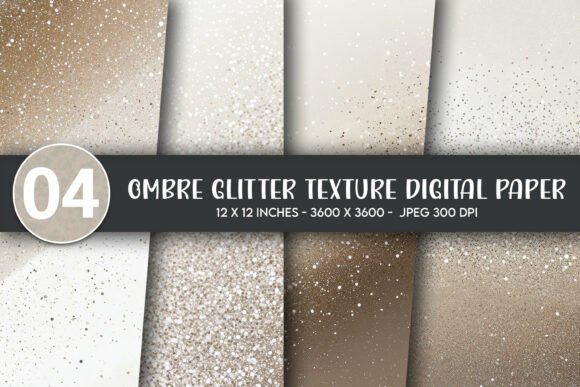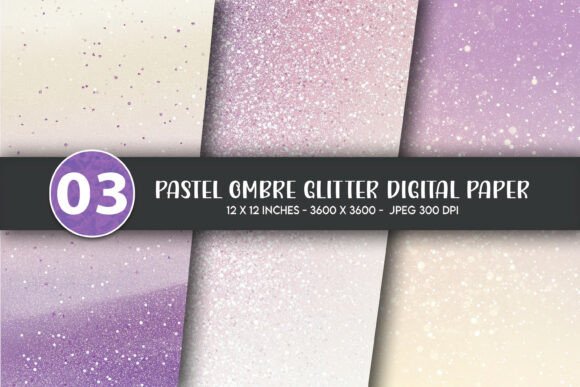
Pastel Ombre Glitter Digital Paper
Soft, shimmering, and effortlessly modern—Pastel Ombre Glitter Digital Paper blends gentle color transitions with subtle sparkle to create designs that feel both calming and celebratory. It’s not just background texture; it’s a versatile design foundation used across wall decor, greeting cards, apparel, mugs, tote bags, throw pillows, stickers, and more. Whether you're designing a nursery poster, branding a small-batch product line, or crafting personalized gifts, this digital paper adds visual interest without overwhelming the message.
Why people reach for Pastel Ombre Glitter Digital Paper—and what they often overlook
Many creators choose Pastel Ombre Glitter Digital Paper expecting instant polish—only to discover later that resolution, file format, or intended use wasn’t aligned with their project. For example, someone ordering for large-format wall art might assume “digital paper” means print-ready by default—yet not all files deliver crisp results beyond 8x10 inches. Others download low-DPI versions thinking they’ll upscale cleanly in Photoshop, only to find pixelation when printed on a 24"x36" poster or heat-pressed onto a onesie.
A common misstep is assuming glitter effect translates equally across mediums. On screen, the shimmer reads as luminous depth. In print—especially on matte paper or fabric—the reflective quality softens or disappears entirely. That doesn’t mean it’s unusable; it means choosing the right application matters. A pastel ombre glitter background works beautifully behind clean typography on a greeting card, but may compete visually if layered over busy patterns on a tote bag.
Resolution isn’t just a number—it’s your project’s ceiling
This Pastel Ombre Glitter Digital Paper comes at 300 DPI and 3600x3600 pixels—a deliberate choice for flexibility. At that size, you can confidently scale down for social media graphics or up for a 12"x12" framed print (at full resolution) or even a 24"x24" wall poster (with minor, imperceptible interpolation). But here’s what many miss: DPI alone doesn’t guarantee clarity. The original file must be created *natively* at high resolution—not upscaled from a smaller source. This version was designed from scratch for print fidelity, so every gradient shift and glitter particle renders smoothly, even when zoomed or cropped.
If you’re using it for t-shirts or onesies, remember that DTG (direct-to-garment) printers handle fine details differently than offset presses. A sharp 300 DPI file gives you room to adjust contrast or brightness before output—something you lose with compressed or low-res alternatives. Test a small crop first: zoom to 200% in your editing software. If edges stay smooth and gradients remain seamless, you’ve got a solid foundation.
Three JPG files—why that matters (and what to do with them)
You’ll receive three JPG files, each offering a distinct variation of the same pastel ombre glitter concept—perhaps differing in glitter density, hue balance, or light direction. This isn’t redundancy; it’s intentionality. One version may suit light-colored mugs better; another may pop more against navy tote bags. Don’t treat them as “extras.” Open all three side-by-side in your design app and preview them over mockups of your actual end products.
JPG is ideal for broad compatibility—no need for special software or plugins—but it’s not editable like layered PSDs. So if you plan to isolate elements (e.g., extract just the glitter overlay), work non-destructively: place the JPG on its own layer, then use blending modes like Overlay or Soft Light to control intensity. Avoid flattening unless absolutely necessary.
What “digital download” really means—and why it changes how you plan
These are digital downloads only. No physical item ships. That’s great for speed and sustainability—but it also means you’re responsible for verifying your setup *before* downloading. Check your device storage (3600x3600 JPGs are ~8–12 MB each), confirm your email accepts attachments of that size, and ensure your design software supports JPG import at full resolution.
Some users download, open in Canva or free editors, and assume cropping or resizing will behave the same as in professional tools. It often doesn’t. Free platforms sometimes auto-compress uploads or limit canvas size. If you’re designing for print-on-demand services (like Printful or Redbubble), upload directly from your computer—not via mobile apps—to preserve integrity.
Matching the paper to your medium—practical pairings
- Wall decor & posters: Use full-size files. Crop thoughtfully—glitter tends to read strongest near the center, so avoid tight margins that cut off subtle transitions.
- T-shirts & onesies: Reduce glitter intensity slightly in editing. Heat application dulls sparkle; a softer base ensures the ombre remains legible even if shimmer fades.
- Greeting cards & stickers: These shine brightest here. Pair with minimalist fonts and generous white space—the pastel ombre glitter becomes the quiet hero, not background noise.
- Mugs & tumblers: Preview wrap-around mockups. The circular shape can warp gradient perception—test how the top-to-bottom fade reads when curved.
- Tote bags & throw pillows: Consider fabric texture. Linen or burlap absorbs detail; cotton or polyester holds fine gradients better. Adjust contrast accordingly.
A final check before you commit
Before downloading or integrating Pastel Ombre Glitter Digital Paper into your workflow, ask yourself three things:
- What’s my largest intended output size? If it’s bigger than 12"x12", verify the 3600px dimension meets your needs (e.g., 3600px ÷ 300 DPI = 12 inches max at native resolution).
- Do I need transparency or layered elements? Since these are JPGs, they have no alpha channel. If your project requires drop shadows, cutouts, or overlays that sit *on top*, plan to add those separately.
- Have I tested color accuracy? Screens vary widely. Soft-proof in sRGB for web use, or convert to CMYK if sending to a commercial printer—just know that pastels and glitter effects shift subtly in print.
When chosen with intention, Pastel Ombre Glitter Digital Paper does more than fill space—it elevates tone, reinforces brand warmth, and invites closer looking. It’s not a shortcut. It’s a thoughtful tool—one that rewards attention to detail, preparation, and realistic expectations. Use it well, and it quietly does the work of making your creations feel finished, intentional, and unmistakably yours.