Free Procreate Pattern Brushes Gift Pack
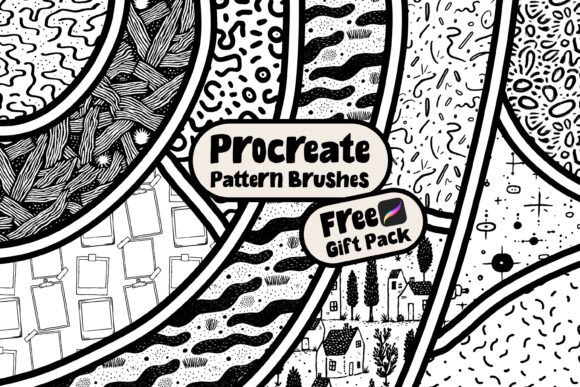
Imagine opening a digital drawer and finding ten seamless, ready-to-use pattern brushes—each designed to tile flawlessly in Procreate, each tested for consistency and clarity. That’s what the Free Procreate Pattern Brushes Gift Pack delivers: no setup friction, no guesswork, just immediate creative utility.
What Makes These Brushes Practical—Not Just Pretty
These aren’t decorative novelties. Each brush in the pack is built with intentional spacing, balanced density, and predictable repeat behavior—so when you stamp, drag, or fill a layer, edges align cleanly without visible seams or distortion. That reliability matters whether you’re sketching a quick textile concept or building a full-brand asset library.
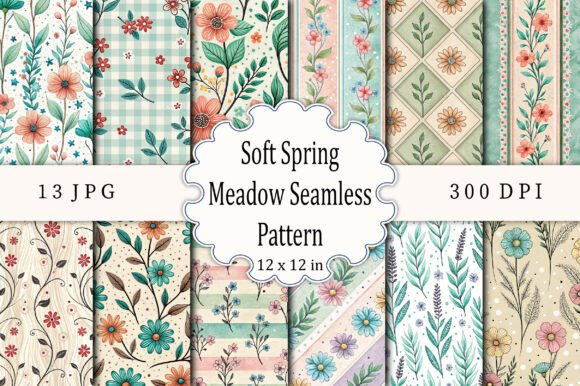
The set includes varied textures and structures: subtle organic dots, crisp geometric grids, hand-drawn crosshatches, soft watercolor repeats, and minimalist line motifs. This diversity means you’re not locked into one aesthetic—you can match tone and texture to your project’s purpose, not force your project to fit a single brush style.
Creative Uses Across Real Projects
Here’s where these brushes earn their place in your daily workflow:
- Surface design drafts: Quickly mock up fabric, wrapping paper, or notebook covers by painting over vector-safe shapes or silhouettes—no need to switch apps or wrestle with manual tiling.
- Social media assets: Add visual rhythm to Instagram carousels or Pinterest pins by layering a low-opacity pattern behind text or icons. A light grid brush, for example, adds structure without competing for attention.
- Educational visuals: Teachers and course creators use the dot or line patterns to create clean, non-distracting backgrounds for diagrams, worksheets, or presentation slides—especially helpful when printing or exporting for accessibility.
- Branding experiments: Try pairing a bold angular pattern with a muted color palette to test how contrast supports brand personality—or soften it with a watercolor-repeat brush to suggest approachability.
For Designers & Freelancers: Speed + Consistency
If you juggle client revisions or tight deadlines, these brushes cut down repetitive tasks. Instead of building custom swatches from scratch for every new pitch deck or product mockup, apply a consistent base pattern across multiple files—and adjust only the color or opacity to suit context. Keep a dedicated “Pattern Swatch” layer group in your Procreate templates so you can toggle visibility on and off while refining composition.
For Marketers & Small Business Owners: Visual Cohesion Without Overhead
You don’t need a designer on retainer to maintain recognizable visual language. Use one pattern brush as your default background for email headers, another for printable promo cards, and a third (scaled smaller) as a subtle watermark on social graphics. The result? A unified look that feels intentional—not accidental—without investing in custom illustration.
For Educators & Hobbyists: Low-Pressure Exploration
Patterns invite play. Try using the crosshatch brush to shade simple character sketches, then flip the canvas and reapply it at 45° for instant depth. Or combine two brushes—like the soft watercolor repeat beneath a fine-line grid—to build layered texture without overcomplicating your layer stack. There’s no “right” way to start; the value is in trying, observing, and adjusting.
How to Keep Results Clear and Audience-Friendly
Patterns support communication—but only when they serve the message, not obscure it. Here’s how to stay effective:
- Start low-opacity: Begin with 10–20% opacity. You can always increase, but reducing clutter later is harder than building up gradually.
- Test on-device: Preview your work on an iPad screen—not just zoomed-in in Procreate. What reads as delicate on desktop may vanish on mobile. Adjust scale or contrast accordingly.
- Anchor with contrast: If using a busy pattern, pair it with high-contrast typography or solid-color elements nearby. A dark serif font over a light dot repeat, for instance, creates hierarchy and improves readability.
- Export smartly: When sharing for web or print, flatten pattern layers *after* final sizing. Avoid rescaling pattern-filled layers post-export—they’ll pixelate or blur unpredictably.
Adapting the Pack for Different Goals
Your goals shape how you use the brushes—not the other way around. A blogger documenting a DIY home project might use the organic dot brush to add gentle texture to mood board collages. A freelance illustrator building a children’s book portfolio could layer the soft watercolor repeat under hand-drawn characters to unify tone across spreads. A small-batch ceramicist might print a scaled-down version of the grid brush onto packaging labels for tactile, repeatable branding.
The key isn’t mastering all ten at once—it’s choosing one that solves a current need. Try this: pick *one* brush this week and use it in three different ways—on a sketch layer, as a background fill, and as a clipping mask overlay. Notice how its role shifts with context. That awareness builds instinct faster than any tutorial.
Next Steps: Expand Thoughtfully, Not Automatically
This Free Procreate Pattern Brushes Gift Pack is a starting point—not a finish line. It’s designed to complement your existing process, not replace judgment or intention. Use it to reduce friction, not outsource decision-making.
When you’re ready to go deeper, view my store to explore other free Procreate brushes—including lettering tools, texture overlays, and stylized mark-makers—all built with the same focus on usability, seamlessness, and real-world application. No sign-ups. No paywalls. Just tools that help you make more, waste less time, and keep your creative momentum steady.