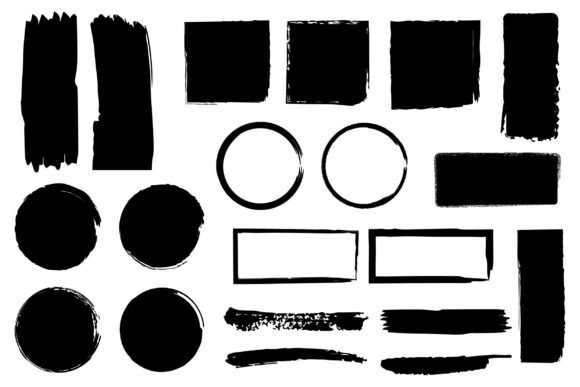
Collection of Abstract Brush Stroke Pack: Versatile, Ready-to-Use Assets for Designers and Creatives
Whether you're crafting a bold brand identity, designing an expressive album cover, or adding organic texture to a digital illustration, the Collection of Abstract Brush Stroke Pack delivers instant visual impact—without the hours spent hand-drawing, scanning, or vectorizing. This isn’t just another set of decorative elements. It’s a thoughtfully curated toolkit built for real-world flexibility, cross-platform compatibility, and creative speed.
Why Brush Strokes Still Matter in a Digital-First World
In an age dominated by clean lines, minimalist UIs, and AI-generated precision, abstract brush strokes offer something irreplaceable: human rhythm. A slight taper, an uneven edge, a subtle bleed—these imperfections communicate energy, movement, and authenticity. Brands increasingly lean into tactile, expressive visuals to stand out in crowded feeds. Think of editorial layouts with dynamic overlays, motion graphics with textured transitions, or packaging that feels handmade—even when it’s printed at scale. The Collection of Abstract Brush Stroke Pack bridges that gap between analog soul and digital efficiency.
What’s Inside: More Than Just Pretty Shapes
This pack goes beyond single-layer PNGs or flat JPEGs. It includes five distinct file formats—each serving a specific purpose in your workflow:
- EPS files: Industry-standard vector format, fully editable in Adobe Illustrator, CorelDRAW, or Affinity Designer. Resize infinitely without quality loss—ideal for large-format prints like billboards or exhibition banners.
- SVG files: Lightweight, code-friendly vectors perfect for web use. Embed directly into HTML, animate with CSS or JavaScript, or integrate into responsive landing pages without loading delays.
- PDF files: Preserves layers, transparency, and vector fidelity while remaining universally viewable and printable. Great for client presentations or handing off to print vendors who prefer PDF workflows.
- JPG files: High-resolution (300 DPI), RGB-optimized raster images. Use them as-is for social media posts, email headers, or layered comps where pixel-perfect blending matters more than scalability.
- PNG files: Transparent-background raster versions—essential for compositing over photos, videos, or gradients. No need to mask or remove backgrounds manually.
Each stroke is individually isolated—not grouped, not stacked, not embedded in mockups. That means you can drag, rotate, recolor, layer, or blend any element exactly how your project demands.
Real-World Uses Across Industries
The Collection of Abstract Brush Stroke Pack thrives where versatility meets intention. Here’s how professionals actually apply it:
- Branding & Identity: Use a sweeping, ink-like stroke as a custom divider in a style guide—or layer multiple strokes behind a logotype to imply motion and craft. Designers at boutique agencies often drop one into a business card layout to add dimension without clutter.
- Web & App Design: SVG strokes animate smoothly on hover or scroll. Try a subtle “paint stroke” reveal effect on hero section headlines, or use a soft watercolor PNG as a background overlay behind a testimonial carousel.
- Print & Packaging: EPS and PDF versions scale flawlessly for luxury product boxes, book covers, or limited-edition posters. One designer recently used a single tapered stroke—rotated and duplicated—to frame a perfume label, replacing costly foil stamping with elegant simplicity.
- Social Media & Content Creation: PNGs with transparency let you quickly build Instagram story templates, YouTube thumbnails, or TikTok intro frames. Add a brush stroke to highlight text, underline a CTA, or create a directional cue—all in under 30 seconds.
- Education & Presentations: Teachers and trainers use JPG and PNG versions to liven up slide decks—adding visual rhythm to bullet points or turning dry data charts into engaging infographics.
How It Fits Into Modern Creative Workflows
Today’s designers juggle tight deadlines, collaborative tools, and multi-device outputs. The Collection of Abstract Brush Stroke Pack was built with those constraints in mind:
- No font dependencies: These aren’t text-based glyphs—they’re self-contained graphics. You won’t hit missing-font errors in Figma, Canva, or InDesign.
- No subscription lock-in: Once downloaded, the files are yours—no cloud sync required, no usage limits, no monthly fee.
- Seamless platform switching: Start in Illustrator (EPS), refine in Figma (SVG/PNG), export for web (optimized SVG), and send final assets to a printer (PDF). All from the same source set.
- Non-destructive editing ready: Because each stroke is isolated and cleanly traced, you can recolor with global swatches, apply blending modes, or convert to outlines without distortion.
Choosing the Right Format—When It Actually Matters
You don’t always need all five formats—but knowing which to reach for saves time and avoids last-minute rework:
- Need to scale to billboard size? Grab the EPS or PDF. SVG works too—but only if your output environment supports full vector rendering (some RIPs don’t).
- Building a fast-loading website? Prioritize SVG for icons or accents; use compressed PNGs (with transparency) only where subtle texture or grain is essential.
- Preparing for offset printing? Use PDF or EPS. Avoid JPG unless explicitly approved by your printer—RGB-to-CMYK conversion can shift tones unpredictably.
- Working in Canva or PowerPoint? PNG is your safest bet. It preserves transparency, loads instantly, and resizes acceptably for screen use.
And yes—every file is pre-checked for consistency: uniform color profiles (sRGB for digital, CMYK-ready for print), clean anchor points, and optimized file sizes. No hidden layers, no stray points, no surprises.
What Sets This Pack Apart From Free Alternatives
You’ll find thousands of “free brush stroke PNGs” online. So why invest in the Collection of Abstract Brush Stroke Pack?
- Licensing clarity: Commercial use included—no attribution required, no restrictions on client projects, no caps on impressions or sales volume.
- Format parity: Free downloads rarely include SVG *and* EPS *and* PDF *and* transparent PNG *and* high-res JPG—all sourced from the same original artwork. Inconsistencies creep in fast when formats are converted secondhand.
- Design cohesion: These aren’t random scans. Each stroke shares a unified aesthetic—consistent pressure variation, intentional texture density, and harmonized opacity ranges—so they layer together naturally, not chaotically.
- Time savings: Searching, downloading, testing, converting, and troubleshooting free assets often takes longer than purchasing a reliable, production-ready pack.
Getting Started Is Instant—No Setup Required
There’s no installation. No plugin. No learning curve. Download the ZIP, extract, and start dragging files into your project. Whether you’re using Adobe Creative Cloud, Affinity Suite, Figma, Sketch, or even Procreate (via PNG import), these assets slot in cleanly. Many users report cutting design time in half on texture-heavy layouts—simply because they’re not redrawing, rescanning, or fighting transparency issues.
If you’ve ever paused mid-project to search “free ink brush PNG transparent background,” then hesitated because the download came with ads, watermarks, or mismatched dimensions—you already know the value of a dependable, ready-to-use resource. The Collection of Abstract Brush Stroke Pack removes that friction entirely.
It’s not about replacing skill—it’s about removing roadblocks so your ideas land faster, sharper, and with more intention.