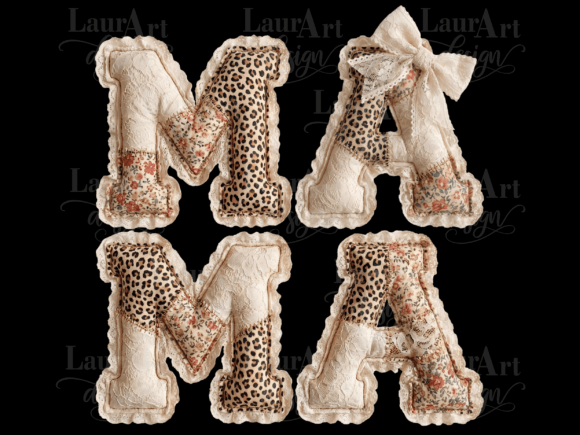
MAMA Lace Leopard Patchwork Mother’s Day
If you’re searching for a distinctive, stylish, and heartfelt design to celebrate Mom this year—especially one that blends vintage charm with modern edge—you’ve likely come across the MAMA Lace Leopard Patchwork Mother’s Day digital artwork. It’s a thoughtfully composed, high-resolution PNG featuring delicate lace textures layered over bold leopard print, arranged in a cohesive patchwork layout with “MAMA” as the central motif. Designed specifically for Mother’s Day, it’s ideal for custom apparel, mugs, tote bags, greeting cards, or sublimation projects—but only if used correctly.
It’s digital—but not all digital files work the same way
A common misconception is assuming “digital download” means universal compatibility. The MAMA Lace Leopard Patchwork Mother’s Day file is a single high-res PNG (300 DPI, 5400 px on the longest side), saved in a ZIP folder. That’s excellent for clarity and print quality—but it’s not a vector graphic. So if you open it expecting to scale infinitely without pixelation, or edit individual elements like “lace” or “leopard” as separate layers in Canva or Cricut Design Space, you’ll hit limitations fast.
Here’s what happens when users overlook that detail: They import the file into software that doesn’t support raster transparency well, resulting in unwanted white backgrounds. Or they try to resize it beyond its native dimensions for large-format prints—only to discover soft edges and visible pixels. Others assume it’s ready for direct cut lines in cutting machines, forgetting that Print-and-Cut workflows require precise registration marks and proper bleed setup—neither of which are embedded in this file.
Watermarking isn’t optional—it’s part of responsible use
This design is licensed for personal and small-business physical use—but with an important condition: watermarking is required when applied to physical products. Why? Because it protects both the creator’s rights and your credibility as a maker. Skipping this step may seem harmless—until a customer notices identical designs sold elsewhere without attribution, raising questions about originality or sourcing.
Think of it like signing your own handmade card: it adds authenticity and honors the craft behind the design. A subtle, low-opacity watermark in a corner—just enough to identify origin without disrupting visual balance—meets the requirement while keeping presentation polished. Tools like Photoshop, GIMP, or even Affinity Photo let you add and fine-tune opacity easily. Avoid placing it over key design elements (like the “MAMA” text) where it could distract or diminish impact.
What to verify before downloading or applying
- Software readiness: Confirm your editing tool supports transparent PNGs at 300 DPI. Photoshop, Procreate, and Photopea handle this smoothly; free online editors sometimes compress or flatten transparency unintentionally.
- Intended output method: Planning sublimation? Great—the transparent background works perfectly. Using heat transfer vinyl (HTV)? You’ll need to isolate the design from its background first (using selection tools), then mirror it appropriately before cutting.
- Cutting machine compatibility: Yes, it works with Print-and-Cut functions—but only if your machine’s software allows importing high-res PNGs *with* accurate edge detection. Test with a small section first; some systems perform better with simplified outlines or pre-traced paths.
- Color accuracy expectations: Since this is raster-based, colors can shift slightly depending on monitor calibration and printer profiles. Always soft-proof using your intended output device’s ICC profile before final production.
Digital resale isn’t permitted—and here’s why that matters to you
The license clearly prohibits reselling the file itself—or repackaging it as part of a “design bundle” for others to download. While it might seem like a quick win for creators building resource libraries, doing so risks takedowns, lost trust, and platform penalties. More importantly, it undermines the ecosystem that lets independent designers keep offering fresh, niche-ready art like MAMA Lace Leopard Patchwork Mother’s Day in the first place.
A better path? Use it as inspiration. Study how the lace and leopard textures interact—then create your own variation using original scans or licensed texture packs. Or combine it thoughtfully with complementary elements (e.g., hand-lettered dates, botanical accents) to build a unique product line—not a copy-paste collection.
Realistic expectations lead to better results
One overlooked factor is presentation context. This design shines on light-colored fabrics, ceramic mugs, or matte paper—but can get visually lost on busy patterns or dark substrates unless adjusted. If printing on black shirts, for example, consider adding a subtle drop shadow or light-colored outline to ensure legibility. Likewise, for social media mockups, avoid over-sharpening the image during export—this can exaggerate pixel structure and reduce perceived quality.
Also worth noting: the file includes no alternate colorways or layout variations. What you receive is one carefully balanced composition. If you need multiple versions (e.g., “MOM” instead of “MAMA”, or vertical orientation), plan to make those edits yourself using layer masks and non-destructive adjustments—not by requesting revisions or assuming they’re included.
Final check-in before you begin
Before launching your project, ask yourself three things:
- Have I confirmed my workflow supports transparent 300 DPI PNGs—and tested output at actual size?
- Is my watermark placement intentional, respectful of the design, and compliant with usage terms?
- Am I treating this as a starting point—not a finished product—to be adapted thoughtfully for my audience and medium?
When approached with care and clarity, the MAMA Lace Leopard Patchwork Mother’s Day design becomes more than decoration. It becomes a conversation starter—a blend of warmth and wildness that reflects how many moms truly are: nurturing, fierce, timeless, and beautifully complex. And that’s something no algorithm, template, or shortcut can replicate.