Various Plants and Floral Wreaths
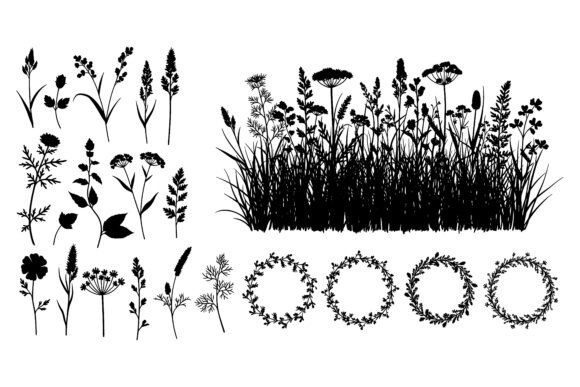
If you’ve ever scrolled through design resources looking for clean, versatile botanical elements—think elegant wreaths, delicate stems, or layered floral arrangements—you’ll appreciate how Various Plants and Floral Wreaths delivers both simplicity and creative flexibility. This collection features black silhouettes of diverse botanical forms—leaves, blossoms, grasses, vines, and full circular wreaths—all set crisply against a pure white background. It’s not just decorative filler; it’s a thoughtfully curated visual toolkit designed to support real-world projects across digital, print, and craft applications.
What Makes This Collection Stand Out?
At its core, Various Plants and Floral Wreaths is built for clarity and adaptability. The black-and-white contrast ensures high readability at any size—from tiny social media icons to large-scale wall art. Each element is delivered in two formats: one scalable EPS file (ideal for vector editing, resizing without quality loss, and professional printing), and one high-resolution JPG file (perfect for quick drag-and-drop use in presentations, websites, or social posts).
The “various” in the name isn’t just marketing—it reflects intentional variety. You’ll find asymmetrical sprigs alongside symmetrical wreaths, tight bud clusters next to airy grassy textures, and single-stem outlines beside layered botanical medallions. That diversity means you’re not stuck repeating the same shape. Whether you need a subtle border, a focal wreath frame, or scattered foliage accents, the collection offers natural rhythm—not rigid uniformity.
Why Designers, Educators, and Small Business Owners Reach for These Silhouettes
For beginners, these silhouettes lower the barrier to creating polished visuals. No drawing skills needed—just select, scale, recolor (if using the EPS in vector software), and place. A blogger launching a wellness site might use a soft wreath to frame a recipe card. A teacher preparing nature-themed worksheets can scatter leaf and blossom cutouts around vocabulary terms. A small-batch candle maker could layer stems and petals into custom labels that feel handmade but remain consistent and professional.
Professionals value the time saved—and the consistency gained. Because all elements share the same line weight, style, and tonal balance, mixing them feels intentional, not haphazard. Unlike clipart with mismatched proportions or inconsistent detailing, this collection behaves like a unified family of shapes. That cohesion matters whether you’re designing a brand identity system or building a cohesive Instagram feed.
Real-World Uses Across Contexts
- Digital media: Add botanical framing to webinar slides, embed wreaths as subtle dividers in email newsletters, or animate individual stems for gentle motion in explainer videos.
- Print & packaging: Use the EPS version to create foil-stamped wreaths on greeting cards, scale leaves for patterned wrapping paper, or arrange blossoms into custom watermarks on stationery.
- Educational tools: Cut out JPG versions for hands-on plant identification activities, or import EPS files into lesson-building platforms to illustrate photosynthesis diagrams with accurate foliage shapes.
- Social content: Overlay a wreath silhouette on a product photo to add organic warmth without distracting from the item itself—ideal for eco-brands, florists, or herbal skincare lines.
- Personal crafts: Print and cut shapes for scrapbooking, decoupage, or stenciling onto fabric or wood surfaces.
Getting the Most From Your Files
Before diving in, keep a few practical points in mind. First, the JPG is best for static use—no transparency unless manually edited, and no scaling beyond its native resolution without potential pixelation. The EPS shines when you need flexibility: change colors, adjust stroke thickness, or combine elements into new compositions using Illustrator, Affinity Designer, or compatible vector editors.
Also worth noting: while the silhouettes are stylized, they’re rooted in real botanical forms—so they read as authentic, not cartoonish. That realism helps them blend naturally into lifestyle, wellness, sustainability, or educational contexts where credibility matters. They won’t look “cliparty” next to photography or hand-drawn illustrations, especially when used with thoughtful spacing and minimal color palettes.
A Note on Color and Stylistic Fit
Because these are black silhouettes on white, they work beautifully with nearly any color scheme. Want earthy tones? Pair with olive, terracotta, and cream. Going modern minimalist? Let them stand alone in black-and-white layouts. Launching a pastel brand? Drop them into soft pink or mint backgrounds—they’ll retain definition without competing. And if your project calls for motion or cinematic texture, the clean edges make them ideal for subtle parallax effects, fade-ins, or layered depth compositing.
Who Benefits Most—and Why
This collection quietly supports several common goals: adding visual warmth without clutter, reinforcing nature-based messaging, elevating DIY projects with pro-level polish, and maintaining brand consistency across touchpoints. Freelancers appreciate having a go-to resource that clients recognize as refined yet approachable. Entrepreneurs building their first website often discover how much stronger their message feels when paired with intentional botanical framing—even something as simple as a wreath surrounding a mission statement.
It’s also surprisingly useful for non-designers. A yoga instructor creating printable class schedules can use stem silhouettes as section dividers. A homeschool parent illustrating a botany unit might print and label each leaf type. Even someone updating their resume with a nature-inspired personal brand can integrate a single blossom or vine motif to express calm focus and growth—without overwhelming the content.
Final Thoughts Before You Begin
You don’t need advanced software or years of experience to benefit from Various Plants and Floral Wreaths. Start small: open the JPG in Canva or PowerPoint, resize a wreath to fit behind a quote, or copy a leaf into a document header. Once you see how easily it lifts your visuals, explore the EPS file in free vector tools like Inkscape—or ask a designer friend to help you customize colors or combine elements.
What makes this more than just another image pack is how it meets people where they are—whether you're sketching ideas on paper, building a Shopify store, or preparing classroom handouts. It’s not about complexity. It’s about giving everyday creators quiet confidence that their visuals communicate care, intention, and connection—to nature, to audience, and to purpose.