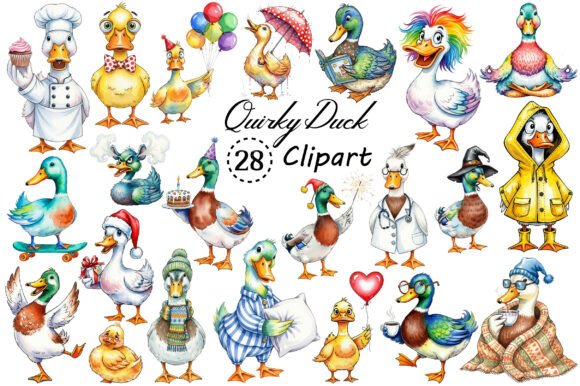
Quirky Duck Sublimation Clipart Bundle
The Quirky Duck Sublimation Clipart Bundle is a purpose-built digital asset pack designed for creators who need expressive, high-quality, and commercially flexible graphics—without the overhead of custom illustration or licensing negotiations. It’s not just another clipart collection; it’s a workflow accelerator. Whether you’re launching a small-batch merchandise line, designing classroom materials, building digital planners, or preparing seasonal greeting cards, this bundle integrates cleanly into existing production pipelines—before design begins, during layout refinement, and even in final quality checks.
Where It Fits in Your Creative or Business Workflow
Think of the Quirky Duck Sublimation Clipart Bundle as a pre-vetted visual component—like a reliable font family or a trusted color palette. You don’t start from zero when selecting typography; similarly, you shouldn’t rebuild foundational illustrations every time you need duck-themed charm for a product or campaign. This bundle sits at the intersection of preparation and execution: it’s ready the moment your project brief lands, your client signs off, or your idea crystallizes.
For print-on-demand sellers, it eliminates the delay between concept and mockup. You can drop a transparent PNG onto a mug template in Canva, adjust sizing and placement, and generate a realistic preview—all in under two minutes. For educators building interactive lesson slides or printable activity kits, the consistent style and clean transparency mean no extra time spent erasing backgrounds or adjusting contrast. For digital planners or Notion templates, these ducks add personality without compromising readability or file size—each PNG is high-resolution but optimized for screen use.
Practical Integration Across Platforms and Tools
The 28 included PNG files are intentionally built for interoperability. Their transparent backgrounds ensure seamless layering in Adobe Photoshop, Affinity Designer, Procreate, Cricut Design Space, Silhouette Studio, and even free tools like Photopea or Google Slides. No clipping masks needed. No background cleanup required. That consistency saves time across platforms—and reduces error risk when switching between editing environments.
If you're using sublimation printers (like Sawgrass or Epson with sublimation inks), the high-resolution output ensures crisp transfers onto polyester-rich fabrics, ceramic mugs, or coated aluminum blanks. For DTG or screen printing workflows, the vector-ready nature of PNGs (when used at appropriate scale) supports clean raster-to-vector conversion if needed later. And because all files are delivered as individual, named PNGs—not a single ZIP with cryptic numbering—you can organize them into your existing asset library by theme (e.g., “Quirky Duck – Celebrations”, “Quirky Duck – Everyday”) or by use case (“Mug Designs”, “Planner Icons”).
Before You Begin: Setup and Organization
Download the bundle once, then immediately sort. Create a dedicated folder labeled “Quirky Duck Sublimation Clipart” inside your main design assets directory. Rename files only if it improves clarity—for example, “duck-party-hat-01.png” instead of “image_17.png”. This small step pays dividends when searching across hundreds of assets later. If you use cloud storage (Dropbox, Google Drive, or Adobe Creative Cloud Libraries), sync that folder so it’s accessible from any device where you design or prep orders.
Test one file first. Open it in your preferred editor, place it on a mockup, and check scaling behavior. Because these are high-res PNGs with transparent backgrounds, they’ll retain fidelity up to 12 inches at 300 DPI—ideal for large-format prints like tote bags or canvas wall art. But avoid extreme upscaling beyond native resolution; instead, rely on their natural versatility across standard product dimensions (e.g., 4×6" for greeting cards, 11×14" for framed prints).
Real-World Use Cases and Implementation Tips
- T-shirt and apparel lines: Combine ducks with hand-lettered phrases or minimalist borders to create cohesive collections. Use the same duck pose across multiple colors or slogans to reinforce brand recognition—even without a logo.
- Digital planners and habit trackers: Drop smaller duck variants into weekly spreads as gentle visual anchors—e.g., a duck holding a pencil next to “Notes”, or one wearing sunglasses beside “Break Time”. Their whimsy adds warmth without distraction.
- Classroom resources: Insert ducks into editable PDF worksheets as reward icons, section dividers, or themed headers for units on animals, habitats, or emotional regulation (“Duck Calm Down Corner”).
- Small business marketing: Use them in email headers, social media banners, or limited-time offer graphics. A duck holding a “50% OFF” sign feels friendly and memorable—especially in niches like parenting blogs, craft supply shops, or eco-friendly brands.
- Scrapbooking and paper crafts: Print on cardstock or sticker paper, cut with precision scissors or a cutting machine, and layer onto physical layouts. The transparent edges mean no white halos around shapes.
Quality Control and Consistency Over Time
Because all 28 files share the same artistic voice—playful but polished, detailed but scalable—they support long-term visual consistency. That matters whether you’re releasing quarterly planner updates or building a multi-year product catalog. You won’t face mismatched line weights, inconsistent proportions, or clashing color palettes mid-project. And since commercial use is explicitly permitted, you can confidently license products containing these elements to clients—or list them on Etsy, Redbubble, or Amazon Merch without legal review delays.
One practical note: always keep your original downloaded files intact and unedited. Save modified versions (e.g., recolored ducks, flipped orientations, grouped compositions) with descriptive names and store them separately. This preserves flexibility—if a client requests a version in pastel tones next month, you’ll start from a clean base rather than a flattened composite.
What This Bundle Doesn’t Require From You
No illustration skills. No stock subscription fees. No attribution requirements. No waiting for approvals or permissions. You don’t need graphic design certification to use it effectively—just basic familiarity with dragging, resizing, and exporting in your tool of choice. That accessibility makes it especially valuable for solopreneurs managing end-to-end workflows: ideation, design, production, listing, fulfillment, and customer follow-up.
It also doesn’t ask you to change your current stack. Whether you run a Canva-based side hustle, a full Adobe Creative Cloud studio, or a hybrid mix of free and paid tools, the Quirky Duck Sublimation Clipart Bundle slots in without friction. Its value isn’t in novelty—it’s in reliability, speed, and quiet confidence that what you’re using is both legally sound and visually cohesive.
Moving Forward With Intention
After downloading, take five minutes to browse all 28 files—not to evaluate them, but to notice patterns. Which ducks read well at thumbnail size? Which ones pair naturally with handwritten fonts? Where might shadows or subtle textures enhance depth without breaking transparency? That kind of observation builds intuitive fluency. Soon, you’ll reach for specific ducks the way a chef reaches for a favorite knife—not because it’s flashy, but because it does exactly what’s needed, every time.
You’re not just acquiring clipart. You’re adding a repeatable, scalable, and legally clear element to your creative infrastructure—one that supports consistency across projects, reduces decision fatigue, and lets you focus energy where it matters most: solving problems, serving audiences, and bringing ideas to life.