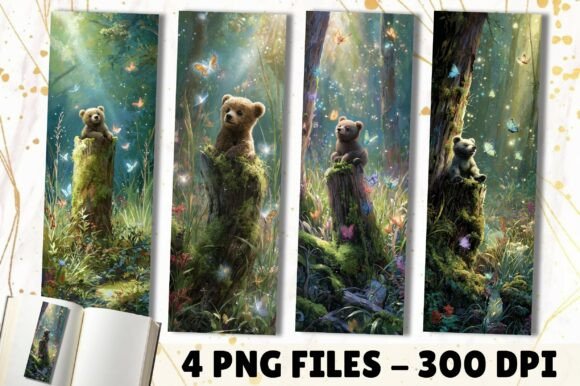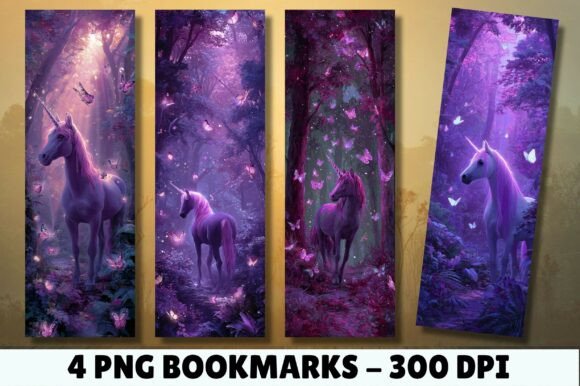
Purple Forest Butterfly Unicorn Bookmark
If you’ve ever searched for a bookmark that’s equal parts whimsical, polished, and versatile—something that works as well in a teacher’s classroom library as it does tucked into a handmade birthday hamper—you’ve likely landed on the Purple Forest Butterfly Unicorn Bookmark. It’s not just another cute digital file. With its dreamy palette of deep purples, iridescent butterflies, and gentle unicorn motifs set against a soft forest-inspired background, this design balances fantasy and sophistication. And because it comes as four high-resolution PNG files (600 × 1800 px, 300 DPI, sized precisely at 2″ × 6″), it’s built for real-world use—not just screen appeal.
Why This Bookmark Stands Out (Beyond the Aesthetic)
Many digital bookmarks sacrifice functionality for charm—tiny details blur when printed, colors shift unpredictably, or dimensions don’t match standard book spine widths. The Purple Forest Butterfly Unicorn Bookmark avoids those pitfalls by design. Its 300 DPI resolution ensures crisp lines even when scaled for laser cutting or sublimation, and the 2″ × 6″ format fits snugly in most adult hardcovers and trade paperbacks without flopping or slipping. That makes it ideal for creators who need consistency across multiple applications: marketing swag for an indie author launch, branded gifts for a small press, or themed classroom rewards that feel special—not generic.
A Common Misstep: Assuming “High-Resolution” Means “Print-Ready on Any Device”
Here’s where many buyers trip up: they download the PNGs, open them in a basic photo editor, print on home inkjet paper, and wonder why the purple looks muted or the butterfly wings lack definition. The issue isn’t the file—it’s the workflow. PNGs preserve transparency and detail, but they don’t auto-correct for printer profiles, paper type, or monitor calibration. If your screen displays vibrant violet and your printer outputs lavender-gray, the mismatch isn’t a flaw in the Purple Forest Butterfly Unicorn Bookmark; it’s a signal to adjust settings *before* bulk printing.
✅ Better approach: Soft-proof your files using your printer’s ICC profile (most modern printers support this in Adobe Photoshop or Affinity Photo). Print a single test copy on your intended paper stock—matte, glossy, or kraft—and compare side-by-side with the on-screen version. Adjust brightness and saturation *only if needed*, keeping edits minimal to preserve the original watercolor texture and delicate line work.
Overlooking Use Cases Beyond the Obvious
People often buy these bookmarks thinking only of books—but their real value multiplies in hybrid projects. For example, educators use them as visual cues in guided reading folders; crafters layer them into junk journal spreads alongside vintage ephemera; and wedding stationers repurpose the butterfly motif as a subtle border element on RSVP cards. Because the PNGs include transparent backgrounds, they integrate cleanly into layered designs without white halos or jagged edges.
⚠️ But here’s what’s easy to miss: the files are *digital-only*. No physical item ships. That’s intentional—it keeps costs low and delivery instant—but it means you’re responsible for choosing compatible tools and materials. Trying to cut the design on a Cricut without converting the PNG to SVG first? You’ll lose fine details. Using it for sublimation without checking your heat-press time/temperature chart? The purple may dull or bleed.
What to Verify Before You Download or Deploy
- File compatibility: Confirm your editing software supports PNG layers and transparency. Free tools like Canva handle basic resizing, but for precise color correction or vector conversion, you’ll want Photoshop, GIMP, or Inkscape.
- Intended output method: Laser cutting? Check that your machine accepts PNGs at 300 DPI—or convert to SVG using a trusted trace tool. Sublimation? Ensure your transfer paper and press settings align with polyester-coated substrates.
- Color expectations: Remember the note about device and printer variance. If brand consistency matters (e.g., matching a book cover’s exact Pantone), request a CMYK proof from your print vendor—or use the bookmark as an accent piece rather than a primary color anchor.
- Licensing scope: These files are for personal and commercial use—including resale in physical products like gift sets—but not for reselling the digital files themselves. If you’re building a printable bundle for Etsy, that’s fine. Reselling the PNGs as standalone downloads? Not permitted.
Realistic Examples of What Works (and What Doesn’t)
Works well: A children’s book author includes one Purple Forest Butterfly Unicorn Bookmark in every pre-order package. She prints 100 copies on 300gsm matte cardstock, rounds the corners with a punch, and ties each with lavender twine. Customers post unboxings on Instagram—the bookmark becomes a quiet branding moment, reinforcing the story’s magical tone.
Less effective: A teacher downloads the files, inserts them directly into a Google Slides deck for a “reading reward” certificate, then exports as PDF and prints. Because Slides compresses images by default, the butterflies appear pixelated. A better move? Insert the PNG into a vector-based tool like Illustrator or use Canva’s “Upload → Resize → Download as PDF (print quality)” workflow instead.
Final Thought: Quality Starts With Intentional Use
The Purple Forest Butterfly Unicorn Bookmark is more than decoration—it’s a small but meaningful touchpoint. Whether you’re curating a cozy reader’s gift box, designing literacy incentives, or adding personality to your own shelf, its strength lies in how thoughtfully it’s applied. Avoid rushing the print step. Don’t assume compatibility across platforms. And never overlook the power of testing—even one sample tells you more than ten assumptions.
When you treat the files as professional-grade assets—not just “cute graphics”—you unlock their full potential. They become part of your voice, your brand, your craft. And that’s where real connection begins.