Praise Him in Every Season PNG
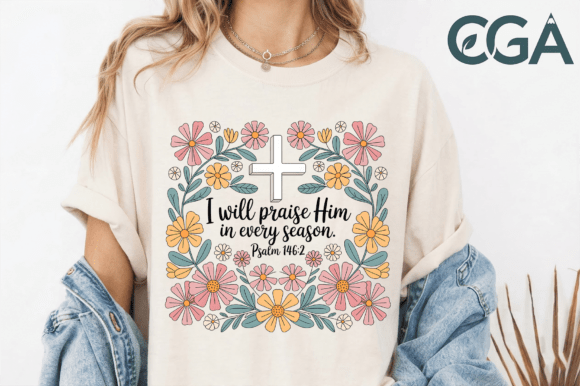
Looking for a faith-centered digital design that balances reverence with visual warmth? The Praise Him in Every Season PNG is more than just a scripture-themed graphic—it’s a thoughtfully crafted creative asset rooted in Psalm 146:2 and designed for real-world use. With its clean white cross centered amid retro-inspired wildflowers in soft pink, orange, and teal, this high-resolution PNG offers both spiritual resonance and aesthetic versatility. Whether you're printing on apparel, sublimating onto pillows, journaling with stickers, or designing church event materials, this file bridges meaning and function—without compromising quality.
Why This Design Stands Out (and Why “Just Any Scripture PNG” Won’t Do)
Many creators assume any Bible verse PNG will serve their needs—especially when searching terms like “Christian digital download” or “Psalm PNG.” But not all scripture graphics are built for practical application. Some lack transparency, others render poorly at scale, and many use fonts or colors that clash with modern print standards or brand palettes. The Praise Him in Every Season PNG avoids those pitfalls: it ships as a single 300 DPI file with a fully transparent background, optimized for layering over fabrics, textured papers, or colored substrates. That means no awkward white boxes around the cross, no pixelation on large-format prints, and no color-shifting when converted to CMYK for professional garment printing.
Common Oversights—and How They Impact Your Projects
Mistake #1: Assuming “high-res” means “print-ready.” A file labeled “HD” or “4K” isn’t automatically suitable for embroidery, screen printing, or sublimation. Resolution alone doesn’t guarantee clarity at different sizes or compatibility with cutting machines. This Praise Him in Every Season PNG was created at true 300 DPI with vector-aligned edges—so whether you’re scaling it down to 1.5 inches for a sticker or up to 12 inches for a wall decal, detail holds. If your design blurs or loses definition when enlarged, it’s likely rasterized at too low a base resolution—or wasn’t optimized for scalability.
Mistake #2: Ignoring background transparency in layered projects. Many free or low-cost scripture PNGs include solid white or off-white backgrounds. That works fine for social media posts—but fails completely on dark fabric, kraft paper stationery, or navy-blue tote bags. Because this Praise Him in Every Season PNG includes a clean alpha channel, you can drop it directly into Canva, Adobe Illustrator, or Cricut Design Space without extra masking steps. No time wasted erasing backgrounds. No risk of jagged edges ruining your final product.
Mistake #3: Overlooking color harmony across mediums. Floral elements in faith-based designs often default to heavy golds, deep purples, or stark contrasts—beautiful in isolation, but difficult to match with existing branding or seasonal decor. The soft pink, muted orange, and gentle teal in this design were chosen for broad compatibility: they complement neutral apparel tones (heather gray, oatmeal, charcoal), pair well with warm wood frames for home decor, and retain readability on both light and medium-toned drinkware. Test your design against your intended substrate—not just on a white screen.
What to Check Before You Download or Purchase
Before adding any digital scripture asset to your cart—or worse, using it in a client project—verify these four things:
- File format & transparency: Confirm it’s a true PNG with alpha transparency—not a JPG saved with “PNG” in the filename.
- Resolution & scalability: Look for explicit mention of 300 DPI and test how it renders when zoomed to 200% in your design software.
- Color mode & palette: RGB is fine for digital use; if you plan to print professionally, ensure the designer notes whether colors translate reliably to CMYK or provide a Pantone reference guide.
- Licensing scope: Does the license cover commercial use for physical products (like t-shirts sold online) or only personal projects? This Praise Him in Every Season PNG includes standard commercial rights—no need to purchase add-ons for basic apparel or home goods applications.
Better Workflow Tips for Real Creators
If you’re building faith-based merchandise—whether for your small church ministry, Etsy shop, or personal gift-making—you’ll save time and avoid rework by starting with intentional file selection. For example: when designing a floral tote bag collection, use the Praise Him in Every Season PNG as your anchor motif, then pull accent colors directly from its wildflower palette to coordinate stitching thread, interior lining, or complementary scripture cards. That kind of cohesion builds brand trust and reduces decision fatigue.
Another practical tip: import the PNG into your design tool at 100% scale first, then adjust *down*—not up—if needed. Upscaling stretches pixels and degrades sharpness, especially around delicate floral outlines. And if you’re prepping for sublimation on polyester pillows, soften the edges slightly in your editing software (a 0.3–0.5 px Gaussian blur) to prevent harsh halos—this subtle step improves perceived quality without altering the design’s integrity.
A Final Note on Meaningful Creation
Digital assets should serve your message—not distract from it. The Praise Him in Every Season PNG succeeds because it honors both craftsmanship and conviction: the cross remains central and uncluttered, the wildflowers suggest growth and variety—not perfection—and the soft palette invites reflection rather than overwhelm. When your audience sees this on a coffee mug or framed in a nursery, they’re not just noticing a pretty image. They’re encountering a quiet, consistent reminder: praise isn’t reserved for springtime blessings. It belongs in every season.
So whether you're a pastor ordering custom hoodies for youth group, a freelance designer crafting Bible journaling kits, or a mom making prayer cards for your small group—choose a file that supports your intent, not one that forces workarounds. That starts with checking resolution, transparency, color fidelity, and licensing—before you open Photoshop or click “add to cart.”