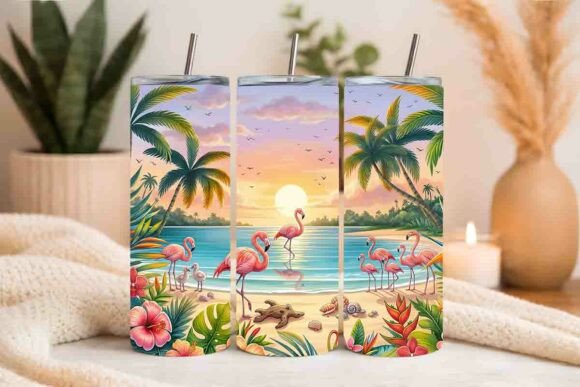
Flamingo Tumbler Wrap: Get It Right the First Time
A Flamingo Tumbler Wrap isn’t just a cheerful graphic—it’s a functional, printable asset designed specifically for 20oz straight skinny tumblers. When applied correctly, it transforms plain drinkware into eye-catching, cohesive branded or personalized items. Whether you're crafting gifts for a friend’s birthday, launching a small-batch merchandise line, or building a consistent visual identity for your café or boutique, this wrap delivers vibrant color, clean lines, and professional-scale output. But not all wraps perform the same—and many people overlook key details before downloading, printing, or applying.
Why Size & Fit Matter More Than You Think
The listed dimensions—9.3″ x 8.2″—aren’t arbitrary. They’re calibrated to wrap snugly around the circumference and height of a standard 20oz straight skinny tumbler (like those from brands such as Stanley, Simple Modern, or generic stainless steel variants). If you assume “any 20oz tumbler” fits the same way, you risk misalignment, gaps at the seam, or stretched distortion near the base or lid. Not all “20oz” tumblers share identical proportions—even minor differences in taper or wall thickness change how the design settles.
What to check before using: Measure your tumbler’s actual height and circumference with a flexible tape measure. Compare those numbers to the wrap’s stated dimensions. If your tumbler is taller, shorter, or slightly tapered, you may need to adjust placement—or choose a different template altogether. Don’t rely solely on product names or marketing terms like “skinny” or “slim.” Real-world measurements trump labels every time.
Resolution Isn’t Just a Number—It’s Your Print Quality Guardrail
At 300 DPI, this Flamingo Tumbler Wrap meets industry standards for crisp, professional-grade printing. That means text stays legible, fine details (like feather texture or subtle gradients) render cleanly, and edges don’t pixelate when scaled or printed large. Yet many users unknowingly downgrade quality by opening the file in low-res preview apps, exporting via screenshot, or converting to web formats like JPEG without preserving resolution settings.
Here’s what happens when resolution slips: printed flamingos look blurry at the beak; pink tones shift toward orange or magenta; white space around the design fills with unintended halos or compression artifacts. The result? A product that feels amateurish—not because the design is weak, but because the technical handoff was compromised.
Better approach: Open the included .ZIP file directly. Use Adobe Photoshop, Illustrator, Affinity Designer, or even Canva’s desktop app (with high-DPI import enabled) to view and prepare the file. Avoid dragging the image into email, messaging apps, or free online editors that auto-resize or compress. Save final print-ready files as PDF/X-1a or TIFF—never as PNG or JPG unless explicitly required by your printer.
The .ZIP File Is More Than Convenience—It’s Your Version Control
This Flamingo Tumbler Wrap ships in a .ZIP package—not as a single JPEG or PNG emailed inline. That structure matters. Inside, you’ll find the primary high-resolution design file, often with layered PSD or AI versions (if applicable), plus a simple usage guide. Some creators skip extracting the full archive and instead use only the first visible thumbnail, assuming it’s the final version. Others double-click and open a preview window that shows a compressed, screen-optimized version—not the production-ready asset.
That oversight leads to mismatched colors, missing bleed areas, or incorrect CMYK/RGB profiles. Worse, if you later need to reposition text or swap a background element, you’ll realize too late that the flattened file you’ve been using has no editable layers.
What to do instead: Always extract the full .ZIP contents to a dedicated folder. Name that folder clearly (e.g., “Flamingo_Tumbler_Wrap_v2”). Keep the original files untouched. Make copies for editing. If you’re sharing with a print shop, confirm whether they prefer RGB for digital printing or CMYK for offset—and convert *only* the copy, not the master.
“Perfect for Custom Gifts” Doesn’t Mean “Plug-and-Play for Everyone”
Yes, this Flamingo Tumbler Wrap works beautifully for custom gift making—but only if you understand the full workflow. Beginners often assume that once downloaded, it’s ready to print, cut, and apply. In reality, success depends on three linked steps: correct printing (on appropriate vinyl or printable wrap material), precise cutting (with bleed and registration marks accounted for), and careful application (using squeegees, heat tools, or application tape depending on media).
Skipping one step—like omitting a 1/8″ bleed area before cutting—means white borders appear where none were intended. Using matte vinyl instead of gloss can mute the vibrancy of the flamingo’s pink. Applying without warming the surface first may cause bubbling or lifting along curved edges.
Realistic example: A teacher ordered 12 wraps for student end-of-year gifts. She printed them on standard sticker paper, cut them by hand with scissors, and applied them wet. The result? Designs slid during application, edges curled within hours, and the glossy finish looked dull under classroom lighting. With the same wrap—but printed on removable glossy vinyl, die-cut with a Cricut Maker, and applied using a soft rubber squeegee—the outcome was durable, seamless, and photo-worthy.
Before You Download or Buy—Ask These Four Questions
- Does my tumbler model match the wrap’s tested dimensions? Check manufacturer specs—not just volume.
- Do I have access to software and hardware that preserve 300 DPI output? If not, budget time to learn or outsource prep.
- Is my printing method compatible with the wrap’s color profile and bleed requirements? Vinyl, heat-transfer, or direct-to-garment printers each have unique needs.
- Am I planning for durability—or just aesthetics? Outdoor use, frequent washing, or dishwasher exposure changes material recommendations.
Getting the Flamingo Tumbler Wrap right isn’t about perfectionism—it’s about respecting the craft behind both design and execution. When you align intention with accuracy—measuring before assuming, testing before scaling, and preserving resolution before sharing—you turn a simple download into something memorable, marketable, and meaningfully made.